
Multicast 224.0.0.1: The All-Hosts Address Powering Local Network Discovery and Communication

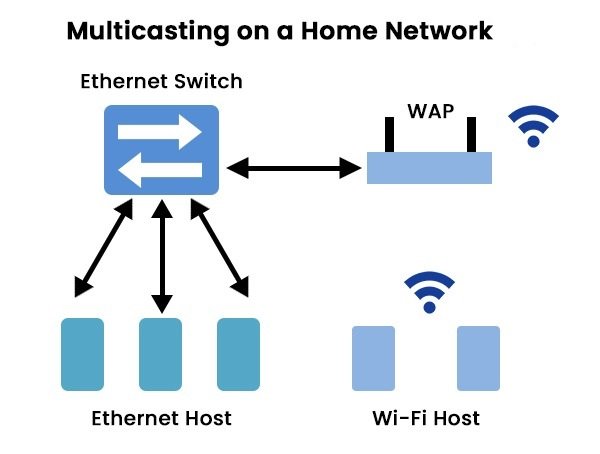
Multicast 224.0.0.1 is one of the most fundamental and widely used addresses in the IPv4 multicast ecosystem. Known as the All Hosts multicast address, it serves as a universal communication channel that allows a device to send packets to every IP-enabled host on the local network segment. Unlike unicast (one-to-one) or broadcast (limited to 255.255.255.255), multicast 224.0.0.1 enables efficient group communication without flooding the entire network unnecessarily. This special address plays a vital role in network protocols, device discovery, routing updates, and system maintenance tasks that keep modern networks running smoothly.
In this comprehensive guide, we dive deep into the technical architecture, historical development, real-world applications, security considerations, troubleshooting scenarios, and future relevance of multicast 224.0.0.1. Whether you are a network engineer managing enterprise infrastructure, a system administrator troubleshooting connectivity issues, a student studying TCP/IP fundamentals, or simply a curious tech enthusiast, this detailed exploration will give you a thorough understanding of how this address functions and why it remains essential even in today’s increasingly complex networking environments.
Understanding Multicast Fundamentals and the Role of 224.0.0.1
Multicast networking represents a sophisticated middle ground between unicast and broadcast. Instead of sending data to a single recipient or every device on the network, multicast delivers information to a group of interested hosts that have explicitly joined a multicast group. The address 224.0.0.1 belongs to the link-local multicast range (224.0.0.0/24), reserved for protocols that operate strictly within a single network segment.
When a device sends a packet to multicast 224.0.0.1, every host on the local subnet that is listening receives it. This makes it incredibly useful for discovery protocols where devices need to announce their presence or request information without knowing the specific addresses of other participants. The Internet Assigned Numbers Authority (IANA) has designated this address specifically for the “All Hosts” group, ensuring consistent behavior across different operating systems and network hardware.
The beauty of multicast lies in its efficiency. A single packet can reach multiple recipients, reducing bandwidth consumption compared to repeated unicast transmissions. This efficiency becomes particularly valuable in environments with many devices, such as enterprise networks, IoT deployments, video streaming setups, and service discovery systems.
Historical Development and Standardization
The concept of IP multicast was formalized in the late 1980s and early 1990s as networks grew more complex and the need for efficient group communication became apparent. RFC 1112, published in 1989, established the foundation for host extensions supporting multicast, including the use of addresses in the 224.0.0.0/4 range.
Multicast 224.0.0.1 was specifically defined to replace and improve upon certain broadcast behaviors while maintaining backward compatibility. Network engineers quickly adopted it for critical protocols such as:
- IGMP (Internet Group Management Protocol) for group membership management
- OSPF (Open Shortest Path First) routing protocol hello packets
- Some implementations of service location protocols
- Various network management and discovery tools
Over the decades, this address has proven remarkably resilient, maintaining its importance even as networking technologies evolved from simple Ethernet LANs to sophisticated software-defined networks and cloud environments.
How Multicast 224.0.0.1 Works in Practice
When a device wants to reach all hosts on its local network, it constructs a packet with the destination address set to 224.0.0.1. The network interface card (NIC) and switch infrastructure handle the distribution efficiently. Modern managed switches often support IGMP snooping, which intelligently forwards multicast traffic only to ports where devices have expressed interest in the group, significantly reducing unnecessary traffic.
Operating systems respond differently to packets sent to this address. Most hosts will process and respond to relevant messages, while routers are configured not to forward these link-local packets beyond the immediate subnet. This containment is intentional and crucial for preventing network-wide disruptions.
In real-world scenarios, you might see multicast 224.0.0.1 traffic during:
- Network boot processes
- DHCP relay operations
- Router discovery protocols
- Network monitoring tool broadcasts
- Certain gaming and collaboration applications
Security Considerations and Best Practices
While multicast 224.0.0.1 is a legitimate and necessary tool, it also introduces security considerations. Because any device on the local segment can send to this address, malicious actors could potentially use it for reconnaissance or denial-of-service attempts through excessive multicast traffic.
Key security practices include:
- Implementing IGMP snooping and querier functionality on switches
- Using access control lists (ACLs) to limit unnecessary multicast traffic
- Monitoring multicast volume as part of network health metrics
- Segmenting networks appropriately to contain broadcast/multicast domains
- Keeping firmware and operating systems updated to patch multicast-related vulnerabilities
Organizations should also educate administrators about the difference between legitimate multicast usage and potential abuse patterns.
Troubleshooting Common Issues with Multicast 224.0.0.1
Network professionals frequently encounter problems related to multicast functionality. Devices failing to discover each other, routing protocols not forming adjacencies, or monitoring tools showing unexpected behavior often trace back to multicast configuration issues.
Common troubleshooting steps include:
- Verifying IGMP snooping settings on switches
- Checking firewall rules for multicast traffic
- Using packet capture tools like Wireshark to inspect traffic to 224.0.0.1
- Confirming proper TTL (Time To Live) settings on multicast packets
- Testing basic connectivity with tools that generate multicast traffic
Mastering these diagnostic techniques helps maintain healthy, efficient networks and reduces downtime caused by multicast-related problems.
The Future of Multicast in IPv6 and Modern Networks
As networks transition toward IPv6, multicast continues to evolve. IPv6 uses a more sophisticated multicast architecture with scope identifiers and improved group management protocols. However, IPv4 multicast addresses like 224.0.0.1 remain relevant during the extended dual-stack period that most organizations are experiencing.
Emerging technologies such as SD-WAN, edge computing, and large-scale IoT deployments continue to rely on efficient group communication mechanisms. Understanding classic IPv4 multicast behavior provides a strong foundation for working with these newer architectures.
Conclusion
Multicast 224.0.0.1, the All-Hosts multicast address, remains a cornerstone of efficient local network communication despite the growing complexity of modern infrastructure. Its ability to reach every device on a local segment without prior address knowledge makes it indispensable for discovery protocols, configuration processes, and various network maintenance tasks. From its historical development through its practical applications and security considerations, this special address demonstrates the thoughtful engineering that underpins reliable networking. As we continue advancing toward more sophisticated and software-defined environments, the principles embodied by multicast 224.0.0.1 continue to inform better design and more efficient communication strategies. Whether you manage enterprise networks, develop connected applications, or simply seek to understand how your devices talk to each other, mastering this fundamental multicast address provides valuable knowledge that enhances both technical capability and network awareness in our increasingly connected world.
FAQ
What is multicast 224.0.0.1?
It is the All-Hosts multicast address used to send packets to every IP host on the local network segment.
What is the difference between 224.0.0.1 and 255.255.255.255?
224.0.0.1 is multicast (group communication), while 255.255.255.255 is limited broadcast. Multicast is more efficient and controllable.
Is multicast 224.0.0.1 forwarded by routers?
No. It is link-local and routers do not forward it beyond the immediate network segment.
Why is 224.0.0.1 important?
It enables critical functions like DHCP discovery, router advertisements, and network device communication without prior configuration.
How can I see traffic to 224.0.0.1?
Use packet capture tools like Wireshark with a filter such as “ip.dst == 224.0.0.1” to monitor this multicast traffic.
Read More:
255.255.255.255: The Ultimate Broadcast Address and Its Critical Role in Modern Networking